Extensions
Cirata Symphony is extensible. New functionality can be added at any time by operating extensions. Extensions typically run independently of the Symphony service, connect to it and expose the capabilities of a system outside of Symphony, like a storage platform, a compute environment, a language model, or a system for transferring data.
Extensions provide additional features to Symphony and its users. They can add new:
- routes and pages to the user interface,
- menu items to the Symphony menu,
- REST operations to the Symphony API,
- microservices to the Symphony endpoints,
- OTLP metrics, logs, and traces to the Observability Extension,
- widgets for use in dashboards and from notebooks, and
- objects and functionality in the Symphony client libraries.
Available Extensions
Cirata provides a collection of production-ready extensions that add core data management, AI, observability, and orchestration capabilities to Symphony. These extensions are available separately from your Cirata representative.
| Extension | Description |
|---|---|
| Ice Flow | Monitor, replicate, and optimize Apache Iceberg data catalogs across Hive, Hadoop, JDBC, AWS Glue, and REST catalog types |
| Data Migrator | Manage and monitor Cirata Data Migrator instances and migrations |
| Cirata Intelligence | MCP server aggregating tools from all Symphony extensions for use with AI clients (ChatGPT, Claude, Copilot, Gemini) |
| Cirata Observability | OpenTelemetry metrics generation and collection for Symphony and connected extensions |
| Cirata Orchestration | Workflow orchestration with Prefect and Airflow integration |
Each extension connects to Symphony and registers its own UI pages, microservice endpoints, and tools. Extensions that provide their own help content are listed under Extensions in the documentation sidebar.
Viewing Extensions in the UI
Connected extensions and their status are visible on the Extensions page in the Symphony UI, accessible from the main menu. When an extension connects, any pages, menu items, and widgets it registers appear automatically throughout the interface—no restart or reconfiguration is needed.
You can also view extensions using the CLI or API:
# Using the CLI
cirata extension list

# Using curl
curl -H "Authorization: Bearer <token>" https://your-symphony-instance.com/api/v1/extensions/all
Why Extensions?
Connectors or adapters let orchestration platforms integrate with other systems. But if these connectors run outside the platform, clients must connect to each one directly—often across security boundaries—which can be insecure or impractical. If they run inside the platform, they may struggle to reach external systems. Different systems often require different technologies, making it harder to manage multiple types of connections from one place. This adds unnecessary complexity to data orchestration.
Symphony solves this by exposing extension functionality directly to clients connected to a Symphony service, which acts as an intermediary between clients and extensions. Clients can then use extensions without knowing where they run or how they're implemented, and can orchestrate them easily, regardless of location, language, or other details. Extensions themselves can operate as users of the functionality exposed by other extensions.
By requiring that all access to the functionality implemented by extensions is performed through the Symphony service, Cirata Symphony can provide common services for enforcing security, capturing metrics, etc. and can support the discoverability of extensions and their services by their users. Because extensions must follow patterns defined by Symphony when operating, they can advertise their behavior in a way that can be communicated to clients.
Extensions connect to Cirata Symphony to operate, and only require a continuous connection if they need to service requests from clients synchronously.
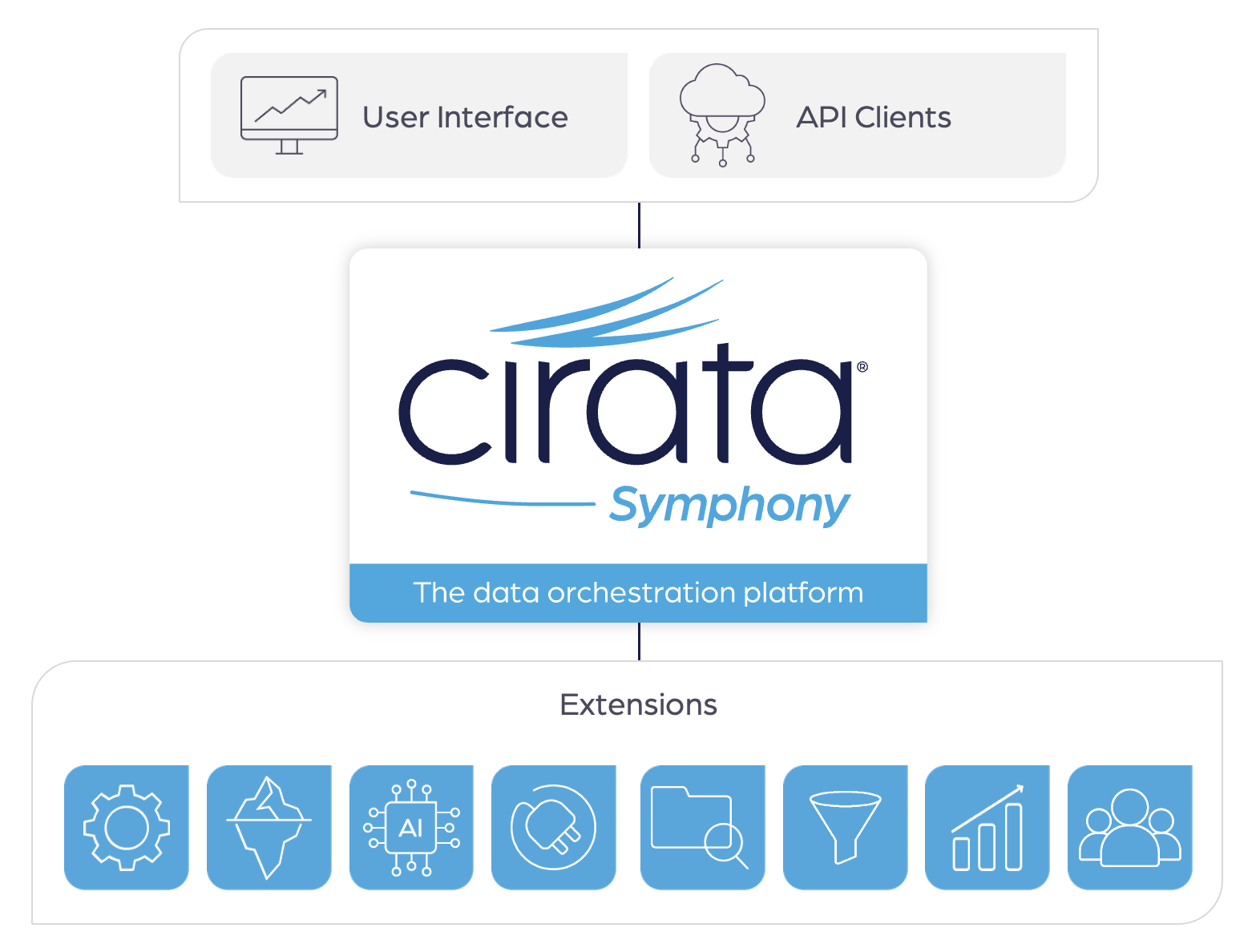
Extensions can be deployed and operate where required, including on-premises or in cloud providers, in distributed computing clusters or alongside scale-out storage platforms, in ephemeral runtimes managed by container orchestrations systems like Kubernetes, or even in embedded devices that operate in edge networks. They are lightweight, and have minimal runtime requirements other than network connectivity to Cirata Symphony.
Extension Operation
Extensions register with Symphony by connecting to it and publishing information about their name, identity, features and capabilities. They are typically implemented as a runtime process, and can operate in any location that can make that connection. They connect using a token as credentials, which associates them with a specific API Key and user identity.
Once an extension has published its features to Symphony, all of its functionality becomes available to the clients with access to it, including other extensions, the Symphony user interface, REST API and messaging interfaces. Clients do not need to be restarted to access the functionality of a new extension, it is made available immediately.
You can view all connected extensions and their status using the CLI or API:
# Using the CLI
cirata extension list

# Using curl
curl -H "Authorization: Bearer <token>" https://your-symphony-instance.com/api/v1/extensions/all
Multi-Instance Deployments
Symphony supports running multiple instances of the same extension type simultaneously for scalability, fault tolerance, and workload distribution. When multiple instances of an extension connect, the platform distributes work across them automatically using several complementary mechanisms.
Stateless request balancing. All microservice endpoints registered by an extension are backed by NATS micro, which load-balances incoming requests across every connected instance. Clients that invoke an extension's service do not need to know how many instances are running — the platform routes each request to an available instance transparently. This works without any code changes in the extension.
Background work partitioning. Extensions that perform background tasks—monitoring external systems, running replication jobs, or executing scheduled work—can use the WorkPartitioner to distribute those tasks across instances. The partitioner uses consistent hashing to assign work items by key, ensuring that each item is processed by exactly one instance. When instances join or leave, work is redistributed automatically.
Queue-based command delivery. Administrative commands sent to the extension (such as configuration updates or operational directives) are delivered to exactly one instance via a NATS queue group. This prevents duplicate processing of commands regardless of how many instances are running.
Instance-specific messaging. For advanced scenarios that require
communicating with a particular instance—for example, querying
instance-local state or implementing leader election—each instance
subscribes to an instance-specific NATS subject. The HTTP API proxy
supports an instance query parameter to route requests to a
specific instance.
From the operator's perspective, multi-instance extensions appear the same as single-instance extensions in the Symphony UI. The Extensions page shows each connected instance with its status, and all instances share the same storage buckets, routes, and menu items. Deploying additional instances requires no changes to Symphony configuration—simply start more copies of the extension with the same API token.
Extension developers choose how deeply to integrate with multi-instance capabilities. Stateless extensions work with multiple instances immediately. Extensions with background tasks adopt the WorkPartitioner for partitioned processing. Extensions that need coordination use instance-specific subjects and targeted messaging.
For a complete guide to implementing multi-instance support in your extension, including code examples in all supported languages, see Multi-Instance Extensions.
Licensing
Extensions can opt in to license enforcement by reporting usage to Symphony. When an extension reports usage, Symphony converts the reported dimensions (such as tables replicated or bytes transferred) into units using rates defined in the active license, and deducts them from the licensed unit pool. Extensions that do not report usage are unaffected by licensing and operate without restriction.
Cirata-provided extensions that require licensing report usage automatically. To use these extensions, the administrator of the Symphony deployment must obtain license files from Cirata and upload them via the Licensing page in the Symphony UI. See Licensing for instructions on uploading licenses and monitoring usage, and Usage Tracking for details on how usage is measured and reported.
If an extension reports usage but no active license covers it, Symphony disables that extension individually—other extensions with valid license coverage continue to operate normally. When the overall licensed unit pool is exhausted or a license passes its expiry date, a grace period begins. During the grace period, extensions covered only by grace-period licenses show a Warning status, while extensions covered by other active licenses continue to show as Operating. Once the grace period expires, enforcement is applied and affected extensions show as Unlicensed until additional licenses are obtained.
Custom extensions built using the Symphony client libraries can also opt in to usage reporting. See the Functionality guide for details on reporting usage from your extension code.
Building Your Own Extensions
Extensions are extremely simple to create. With the client libraries provided by Symphony, a complete extension can be implemented in just a few lines of code. A fully-featured extension — including fine-grained capabilities, a standard registration flow, menus, a user interface, and services — is demonstrated by this complete example:
"""
Copyright 2025 Cirata.
"""

import asyncio
from cirata import symphony
from cirata.symphony.logging import configure_logging

configure_logging("demo")

page = """
import { useContext, useEffect } from 'react'
import { SymphonyContext } from '@symphony'

export default function Demo() {
  const symphonyContext = useContext(SymphonyContext)
  useEffect(() => {
    symphonyContext.setTitle({
      "/": "Home",
      "/demo": `Demo Extension for ${symphonyContext.symphonyInfo.name}`
    })
  }, [symphonyContext.setTitle, symphonyContext.symphonyInfo.name])

  return (
    <h1>Hello World</h1>
  )
}
"""

async def echo_handler(req):
  """Echo back the request data with a greeting."""
  return await req.respond(b"Hello, " + req.data)

async def main():
  try:
    async with symphony.Extension("Demonstration", "demo") as extension:
      extension.add_capability("sub", "extensions.demo", "Demonstration Extension")
      extension.add_capability("sub", "extensions.demo.hello", "Say hello")

      if extension.token:
        extension.add_resource("ui://demo", "text/symphony-jsx", page)
        extension.add_route("/demo", "ui://demo")
        extension.add_menu("Demo Service", "Demo Page", "/demo", "fa-heart")

        endpoints = await extension.add_endpoints(name="Microservice", version="0.0.1", description="Demo extension")
        group = endpoints.add_group(name="cirata.extensions.demo")
        await group.add_endpoint(name="hello", handler=echo_handler)

      await extension.operate()
  except RuntimeError as e:
    print(f'Unable to initialize: {e}')

if __name__ == '__main__':
  asyncio.run(main())
Cirata Symphony provides libraries for Python, Java, Go, and Rust to make extension development straightforward, but you can choose to use any language that you prefer. User interface development for extensions employs TypeScript, React, and ECMAScript Modules (ESM) without the need to package or bundle them with your UI code.
Dynamic JavaScript Loading
When an extension registers a UI component, Symphony compiles and renders the extension's TypeScript/JSX code in the browser. How the imported JavaScript libraries are resolved depends on the dependency resolution mode an administrator configures in Platform Settings:
- Proxy mode (default): bare specifiers in extension JSX are fetched at runtime from the jsDelivr CDN via a server-side proxy and cached locally. Authors can import any npm package without pre-bundling.
- Mixed mode: extensions that ship a pre-built dependency bundle resolve their imports locally; bare specifiers not in a bundle fall through to the jsDelivr proxy.
- Bundle-only mode: the jsDelivr proxy is disabled. Extensions must ship pre-built dependency bundles for every non-platform import. Suitable for air-gapped, compliance-restricted, or supply-chain-hardened deployments.
Forty common libraries (React, MUI, dayjs, react-router, the
@symphony/... aliases, etc.) are platform externals: they are
preloaded by Symphony's own UI and made available to every
extension regardless of mode. Extensions never need to bundle these.
See Outbound Network Access for the network implications of each mode.
Bundled UI Dependencies
For deployments running in Mixed or Bundle-only mode — or any deployment that wants to reduce CDN dependency at runtime — an extension can ship a pre-built bundle of the JavaScript libraries its UI imports.
An extension's bundle is:
- Built ahead of time with the
@cirata/symphony-bundle-recipepackage wrapping esbuild, producing a tree of content-hashed ES-module chunks. - Uploaded to Symphony at extension start via the SDK's
bundle helper:
- Python —
await extension.add_bundle(version, bundle_dir, promote) - Rust —
ext.add_bundle(version, bundle_dir, promote).await? - Go —
ext.AddBundle(symphonyURL, version, bundle_dir, promote) - Java —
runtime.addBundle(symphonyUrl, version, bundleDir, promote)
- Python —
- Served locally from
/extensions/{identifier}/bundle/{version}/...withCache-Control: public, max-age=31536000, immutable. Theidentifieris the registration identifier minted at provision time (a UUID), not the extension's prefix — two accounts may run their own iceflow extension and each gets its own identifier-keyed bundle storage. Symphony's loader rewrites the extension's bare- specifier imports to these URLs at JSX-transform time.
When to bundle
| Situation | Bundle? |
|---|---|
| The extension only imports platform externals (React, MUI, dayjs, etc.) | No — externals resolve through platform shims regardless of mode. |
The extension imports an npm package not in externals.config.ts | Yes, if the deployment runs (or might run) in Mixed or Bundle-only mode. |
| The deployment is or will be air-gapped | Yes for every extension; the deployment cannot run Bundle-only mode without bundles for every non-platform import. |
Examples
The first-party globe extension is a worked example: it imports
globe.gl (~4 MB) and three (~1.2 MB), neither of which is in
the platform externals list. It builds these into a bundle via
extensions/python/globe/build-bundle.mjs and uploads the bundle
through extension.add_bundle() at registration. With cdn_mode set
to mixed or bundle-only, the browser loads
/extensions/{globe-identifier}/bundle/1.0.0/globe.gl-<hash>.js
instead of /npm/globe.gl/+esm (where {globe-identifier} is the
registration identifier of the globe extension in the calling user's
account, resolved by the loader from the bundle index).
A minimal canonical example lives at extensions/python/bundle_smoke/,
which bundles only the small uuid library. Use it as a starting
template for new bundled extensions.
Bundling recipe
The end-to-end developer workflow — recipe install, build script, SDK invocation, troubleshooting — is documented in detail in the Bundling UI Dependencies extension-developer guide.
To get started building your own extension, see the Build Your First Extension tutorial and the Development guides for each language.
See Also
- Build Your First Extension—Step-by-step tutorial
- Platform Capabilities—Routes, pages, menus, widgets, services, and more
- Python Development—Python extension library reference
- Java Development—Java extension library reference
- Go Development—Go extension library reference